Performance & Security Testing — Frequently Asked Questions
Performance Testing
What is Performance Testing in QAEverest?
Performance Testing lets you run real load simulations against any HTTP endpoint directly from QAEverest. It measures how your application behaves under varying levels of traffic and reports key metrics such as response time, throughput, and error rate.
What types of performance tests are available?
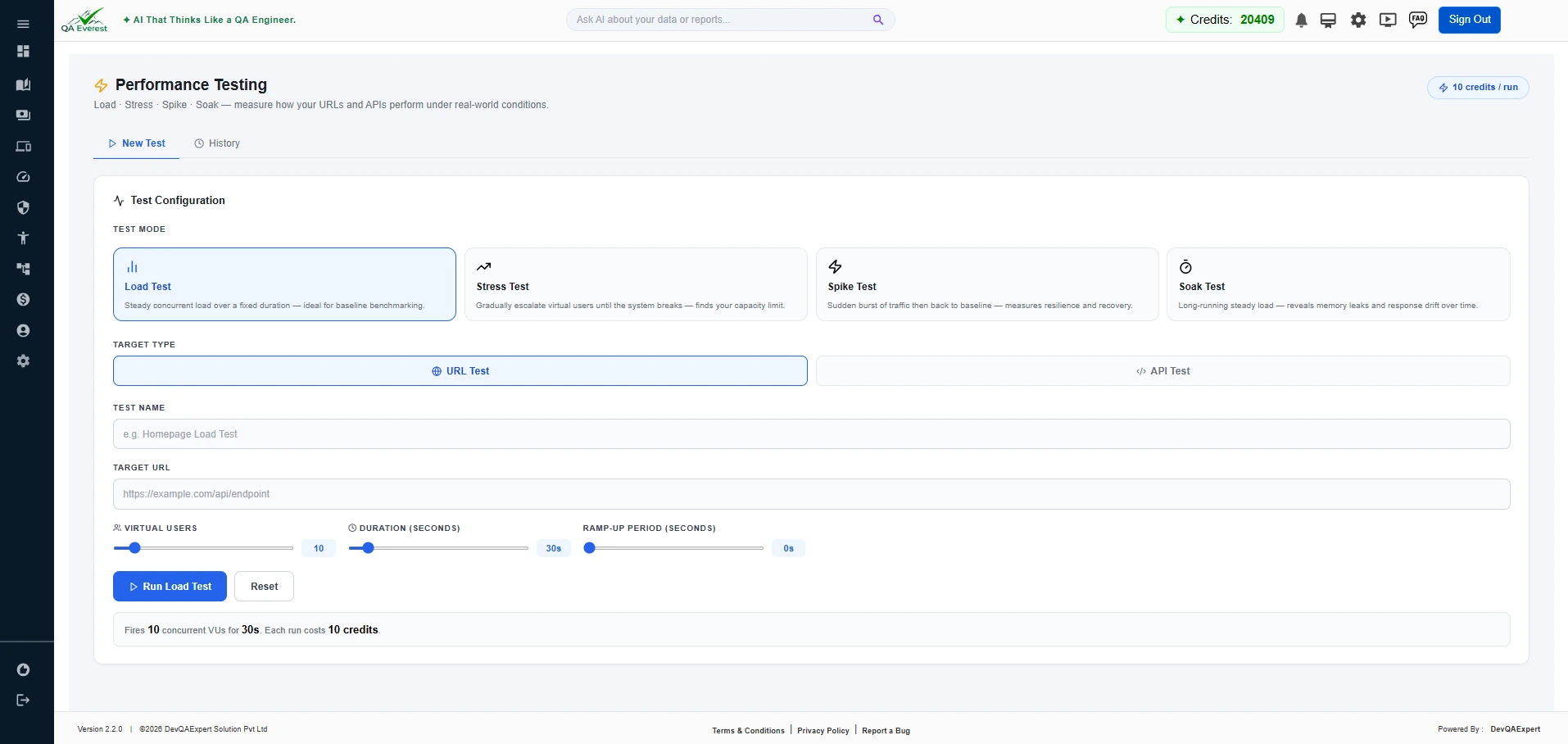
- Load Test — Steady concurrent load over a fixed duration. Ideal for baseline benchmarking to see how your system handles expected traffic.
- Stress Test — Gradually escalates virtual users until the system breaks. Finds your capacity limit and how gracefully the system degrades.
- Spike Test — Sudden burst of traffic then back to baseline. Measures resilience and how quickly the system recovers from unexpected load spikes.
- Soak Test — Long-running steady load over an extended period. Reveals memory leaks, connection pool exhaustion, and response drift over time.
How do I create a performance test run?
- Navigate to Performance in the sidebar.
- Click "+ New Test".
- Enter the target URL, select a test mode (Load / Stress / Spike / Soak), and configure parameters such as virtual users and duration.
- Click "Run". Results appear on the same page when the test completes.
How many credits does a performance test consume?
Each performance test run consumes 10 credits regardless of duration or test type.
What metrics does a performance test report?
- Average, minimum, and maximum response time
- Requests per second (throughput)
- Error rate and HTTP status code breakdown
- Virtual user ramp-up/down profile
- Test start time and total duration
Can I view previous performance test results?
Yes. All past runs are listed on the Performance page. Each entry shows its mode, status, run timestamp, and summary metrics. Click any run to see the full detailed report.
Can I stop a performance test that is already running?
Yes. Click Stop Test while the test is running and confirm. Execution ends straight away and the report keeps whatever was measured up to that point, marked Test stopped. The 10 credits for the run are not refunded, and phases that never ran — such as the cool-down of a spike test — are reported as not measured.
Can I delete a performance test run?
Yes. Click the trash icon next to any run on the Performance page to permanently delete that run and its results.
Security Testing
What is Security Testing in QAEverest?
Security Testing scans a target URL for common vulnerabilities, misconfigurations, and weaknesses. It provides an automated audit report categorising findings by risk level (Critical, High, Medium, Low, Info) so you can prioritise remediation.
What scan types are available?
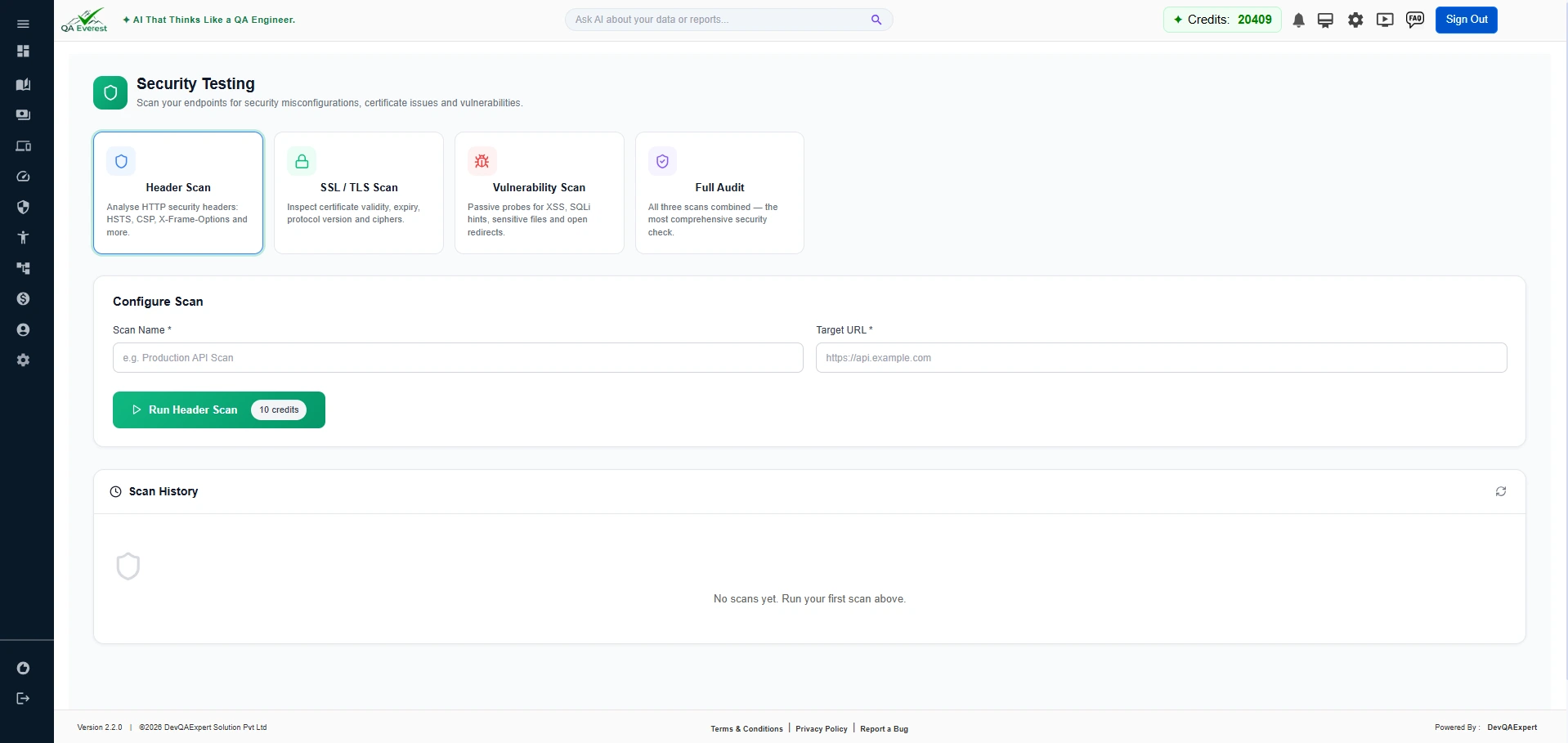
- Header Scan — Checks HTTP response headers for security misconfigurations such as missing Content-Security-Policy, X-Frame-Options, or HSTS headers.
- SSL/TLS Scan — Validates your SSL certificate, checks for weak cipher suites, protocol versions (TLS 1.0/1.1), and certificate expiry issues.
- Vulnerability Scan — Identifies common web vulnerabilities including exposed admin paths, insecure CORS settings, and outdated software signatures.
- Full Audit — Runs all scan types together and produces a consolidated risk report across headers, SSL, and vulnerabilities.
How do I run a security scan?
- Navigate to Security in the sidebar.
- Enter the target URL you want to scan.
- Select the scan type (Header, SSL/TLS, Vulnerability, or Full Audit).
- Click "Run Scan". The findings will appear once the scan completes.
How are security findings categorised by risk?
Each finding is assigned a risk level:
- Critical — Immediate action required; actively exploitable.
- High — Serious risk; should be addressed promptly.
- Medium — Moderate risk; plan remediation.
- Low — Minor risk; address as part of routine hardening.
- Info — Informational; no direct risk but worth noting.
Can I view past security scan results?
Yes. All previous scans are listed on the Security page with their scan type, status, and issue count summary. Click any scan entry to view the full findings detail.
Does security testing work on private or internal URLs?
Security scans require the target URL to be publicly accessible. Internal or localhost addresses are not reachable from QAEverest's scan engine.