Accessibility Testing — Frequently Asked Questions
What is Accessibility Testing in QAEverest?
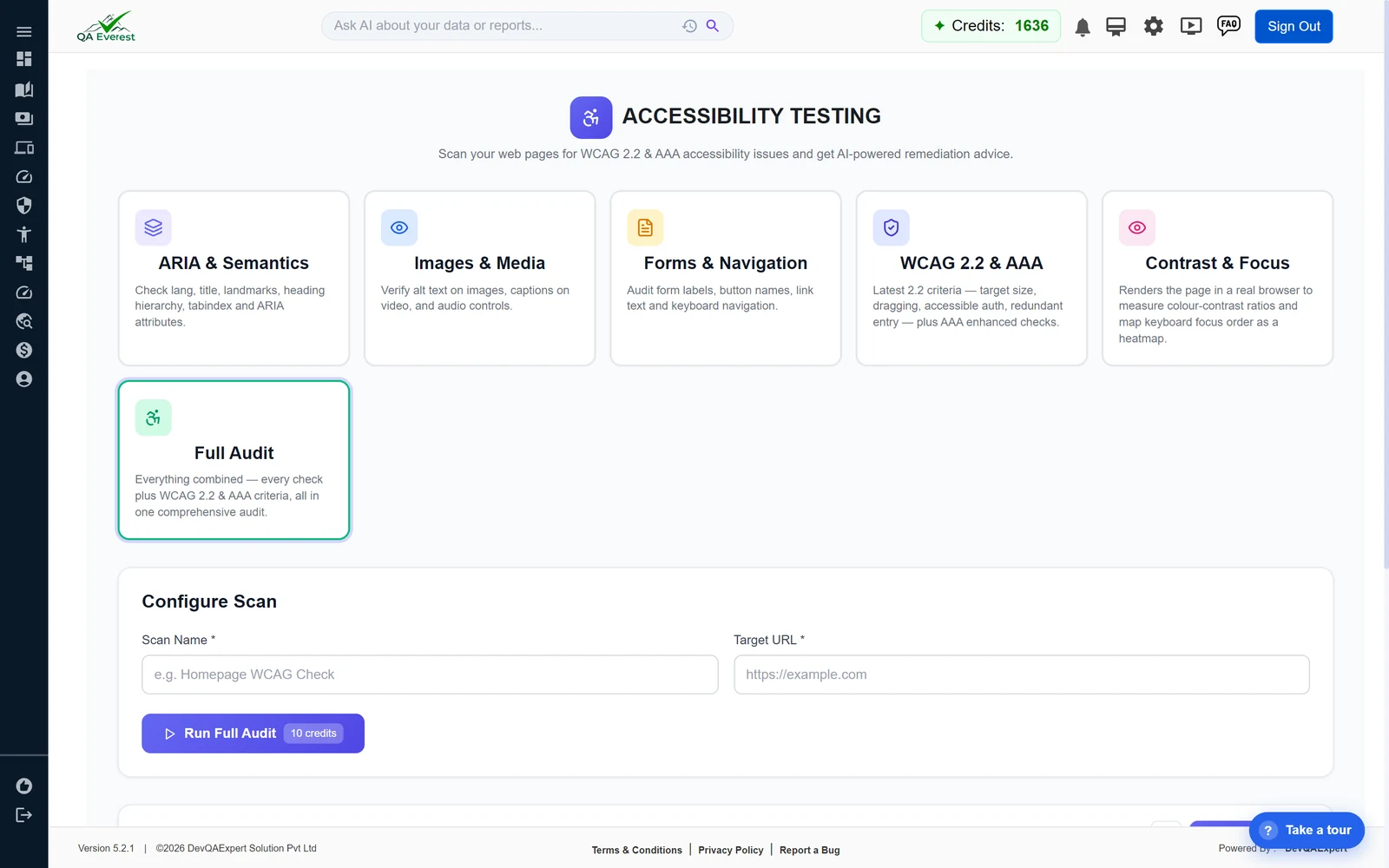
Accessibility Testing scans your web pages for WCAG 2.2 & AAA accessibility issues and gives you AI-powered remediation advice. You enter a scan name and a target URL, pick a scan type, and QAEverest audits the page against the Web Content Accessibility Guidelines, reporting findings, an overall impact, an issue count, and a score from 0–100.
Which accessibility standards does it check against?
Scans cover the Web Content Accessibility Guidelines WCAG 2.1 and WCAG 2.2 across all three conformance levels — A, AA, and AAA. Every finding is stamped with its WCAG success-criterion number, its conformance level, and the WCAG version it comes from, so you know exactly which guideline it maps to.
What scan types are available?
- ARIA & Semantics — Checks lang, title, landmarks, heading hierarchy, tabindex and ARIA attributes.
- Images & Media — Verifies alt text on images, captions on video, and audio controls.
- Forms & Navigation — Audits form labels, button names, link text and keyboard navigation.
- WCAG 2.2 & AAA — Latest 2.2 criteria such as target size, dragging, accessible authentication and redundant entry, plus AAA enhanced checks.
- Contrast & Focus — Renders the page in a real browser to measure colour-contrast ratios and map keyboard focus order as a heatmap.
- Full Audit — Everything combined: every check plus WCAG 2.2 & AAA criteria, all in one comprehensive audit.
How do I run an accessibility scan?
- Open Accessibility from the sidebar.
- Choose one of the six scan-type cards (Full Audit is selected by default).
- Enter a unique Scan Name and a valid Target URL(including
http://orhttps://). - Click Run. Results appear as a "Latest Scan" panel when the scan completes.
How is the accessibility score calculated?
Each scan produces a score from 0–100. It starts at 100 and deducts points for every issue weighted by severity — critical issues cost the most, then serious, moderate, and minor. The result also shows the overall impact and a conformance breakdown across WCAG levels A, AA, and AAA.
What does the AI Accessibility Analysis add?
After a scan you can click Analyze to get an AI-generated verdict (pass, warning, or critical), a short plain-language summary, key findings, and concrete remediation recommendations — turning raw findings into an actionable fix list.
Can I schedule recurring accessibility scans?
Yes. You can create Scheduled Monitors that re-run a scan automatically on an Hourly, Daily, or Weekly schedule, with an "Alert below score" threshold. Monitors can be paused, resumed, run immediately, or deleted, and each automated run is saved to your scan history.
How many credits does an accessibility scan consume?
Each accessibility scan consumes 10 credits. Scheduled monitor runs cost the same 10 credits per run. Credits are checked before the scan starts, and both personal and organisation balances are supported.
Can I view my past accessibility scans?
Yes. Every scan is saved to your Scan History, showing the name, type, URL, score, issue count, impact, status, and timestamp. Click any entry to view the full findings detail, or delete scans you no longer need.