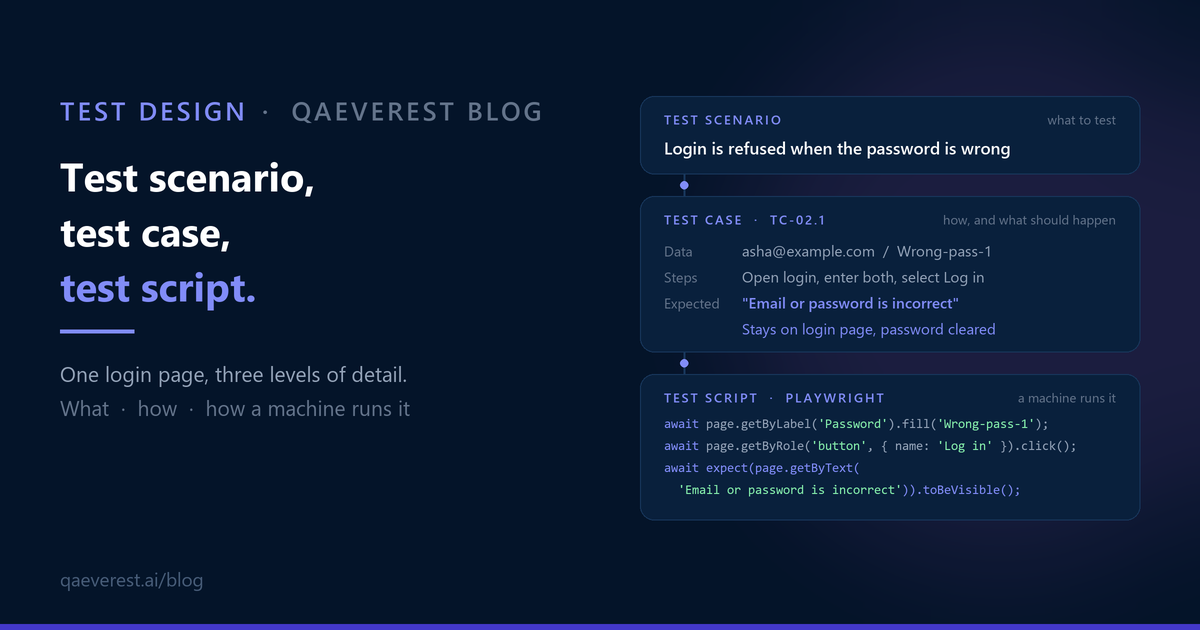
A release meeting, one feature: the new login page. Someone asks whether it's covered.
One answer is "six scenarios". Another is "fourteen test cases". The pipeline dashboard shows "nine scripts, all green". All three are correct, and nobody in the room can say whether the login page is covered, because the three numbers count different things.
Test scenario, test case and test script are three of the most-used terms in QA, and they get used interchangeably. They aren't the same thing. Each one sits at a different level of detail and answers a different question. Once a team agrees on which is which, coverage conversations get much shorter.
This post explains the difference with one worked example: the login page of an online shop, taken from scenario to test case to script.
The short answer
- A test scenario says what to test. It's one line, one situation that has to work.
- A test case says how to check it: preconditions, test data, steps and an exact expected result.
- A test script is a test case written so that a machine can run it, usually as automation code.
Each level adds detail to the one above it. One scenario usually becomes several test cases. A test case becomes a script only when it's worth automating.
| Test scenario | Test case | Test script | |
|---|---|---|---|
| Answers | What should we test? | How exactly do we check it, and what should happen? | How does a machine run that check? |
| Level of detail | One line | Preconditions, data, steps, expected result | Code, with every expected result as an assertion |
| Usually written | During story refinement and planning | Once the behaviour is agreed | Once the case is stable and worth running often |
| Main readers | QA, product, developers | Testers, reviewers, auditors | Automation engineers and the CI pipeline |
| Example | Login is refused when the password is wrong | Wrong password for a registered email shows "Email or password is incorrect" and stays on the login page | `await expect(page.getByText('Email or password is incorrect')).toBeVisible();` |
Level 1: test scenarios
A test scenario is a situation the product has to handle, written as one line. It doesn't say how to test it. It says what has to be true.
Here are the scenarios for the shop's login page:
| ID | Test scenario |
|---|---|
| TS-01 | A registered user logs in with the correct email and password |
| TS-02 | Login is refused when the password is wrong |
| TS-03 | Login is refused when a required field is empty |
| TS-04 | An account is locked after repeated failed attempts |
| TS-05 | A user can reset a forgotten password from the login page |
| TS-06 | A logged-in session ends after the idle timeout |
That list fits on a screen, and anyone can read it: a product manager, a developer or a new tester. That's what scenarios are for. They make it quick to ask "what's missing?" before anyone writes a step. Someone looking at this list might ask about logging in with Google, or about what happens on a phone. Those are new scenarios, and they cost one line each to add.
A good scenario has an outcome in it. "Test login" isn't a scenario, because there's nothing to check. "Login is refused when the password is wrong" is one, because you can tell whether it's true.
Level 2: test cases
A test case takes one way a scenario can play out and pins it down: the starting state, the exact data, each step, and what should happen.
One scenario usually has several. TS-02 ("login is refused when the password is wrong") has at least three that behave differently:
| ID | Test case |
|---|---|
| TC-02.1 | Wrong password for a registered email shows a generic error |
| TC-02.2 | The correct password typed in the wrong case is refused |
| TC-02.3 | A password entered for an unregistered email shows the same generic error |
TC-02.3 is the kind of case a scenario alone won't surface. If the error for an unknown email differed from the error for a wrong password, the login page would tell anyone which email addresses have accounts. Finding cases like that is test design. It's the part of the work that needs a tester's judgement.
Here is TC-02.1 written out in full:
| Field | Value |
|---|---|
| ID | TC-02.1 |
| Scenario | TS-02 Login is refused when the password is wrong |
| Title | Wrong password for a registered email shows a generic error |
| Preconditions | An active account exists for asha@example.com. The user is logged out. |
| Test data | Email: asha@example.com. Password: Wrong-pass-1 |
| Priority | High |
| Step | Action | Expected result |
|---|---|---|
| 1 | Open the login page | The form shows Email and Password fields and a Log in button |
| 2 | Enter asha@example.com in Email | The email is accepted as typed |
| 3 | Enter Wrong-pass-1 in Password | The characters are masked |
| 4 | Select Log in | The message "Email or password is incorrect" appears. The user stays on the login page. The Password field is empty. |
Two things make this a test case rather than a longer scenario. First, anyone who runs it uses the same data and does the same thing. Second, the expected result is exact. "An error appears" would let two testers pass two different behaviours. "Email or password is incorrect, user stays on the page, password cleared" doesn't.
Level 3: test scripts
A test script is a test case turned into instructions a machine can follow. Here is TC-02.1 as a Playwright test:
```typescript import { test, expect } from '@playwright/test';
// TC-02.1 Wrong password for a registered email shows a generic error test('TC-02.1 wrong password shows a generic error', async ({ page }) => { // Step 1: open the login page await page.goto('https://shop.example.com/login');
// Steps 2 and 3: enter the email and the wrong password await page.getByLabel('Email').fill('asha@example.com'); await page.getByLabel('Password').fill('Wrong-pass-1');
// Step 4: select Log in await page.getByRole('button', { name: 'Log in' }).click();
// Expected result: one assertion for each part of it await expect(page.getByText('Email or password is incorrect')).toBeVisible(); await expect(page).toHaveURL(/login/); await expect(page.getByLabel('Password')).toHaveValue(''); }); ```
Look at the last three lines. Every expected result in the test case became an assertion in the script. That's why the test case matters even when the script exists. If the case had said "an error appears", the script would have had nothing exact to check, and it could pass while the page showed the wrong message.
"Test script" has two meanings
You'll see the term used in two ways, so it's worth knowing both:
- In most teams today, a test script means automation code, like the Playwright test above.
- In older standards and in manual testing, a test script can mean any detailed, step-by-step procedure, including one a person follows. "Scripted testing" in that sense is the opposite of exploratory testing, not of manual testing.
When someone says "script", check which one they mean before you count anything.
Why Gherkin blurs the line
Teams that write tests in Gherkin (Given / When / Then) have an extra source of confusion. In Gherkin, the keyword `Scenario` holds what this post calls a test case: concrete steps, concrete data and an expected outcome.
Here is TC-02.1 in Gherkin:
```gherkin Feature: Login
Scenario: Wrong password for a registered email shows a generic error Given an active account exists for "asha@example.com" And the user is logged out When the user logs in with "asha@example.com" and password "Wrong-pass-1" Then the message "Email or password is incorrect" is shown And the user stays on the login page And the password field is empty ```
And all three TS-02 cases as one `Scenario Outline`, with one row of data per case:
```gherkin Scenario Outline: Login is refused with a generic error Given an active account exists for "asha@example.com" with password "Shop-pass-1" When the user logs in with "<email>" and password "<password>" Then the message "Email or password is incorrect" is shown
Examples:
| case | password | |
|---|---|---|
| TC-02.1 | asha@example.com | Wrong-pass-1 |
| TC-02.2 | asha@example.com | SHOP-PASS-1 |
| TC-02.3 | nobody@example.com | Shop-pass-1 |
```
| Gherkin keyword | What it is in the terms above |
|---|---|
| `Feature` | A group of related scenarios, such as "Login" |
| `Scenario` | A test case with steps and an expected result |
| `Scenario Outline` with `Examples` | A test case template, run once per data row. Each row is effectively its own test case. |
| `Given` | Preconditions |
| `When` | The steps |
| `Then` | The expected result |
So when a BDD team says "we have forty scenarios", they usually mean forty test cases. Neither usage is wrong. The fix is to agree on one vocabulary for the team and use it in every report.
When each one earns its place
Test scenarios are the right tool when you're deciding what to test:
- Story refinement and sprint planning, before the behaviour is fully agreed
- Checking coverage against a requirement: is every rule in the story covered by at least one scenario?
- A charter for an exploratory session
- A quick estimate of testing effort
Test cases are the right tool when a check has to be repeatable:
- Regression testing, where different people need to run the same check the same way
- Evidence for auditors, customers or a release decision
- Onboarding: a new tester learns the product from well-written cases
- The basis for automation, because a script can only be as exact as the case behind it
Test scripts are worth writing when a check runs often and doesn't need human judgement:
- Critical flows that should run on every build
- Checks that repeat across many data combinations or browsers
- Stable features whose behaviour isn't changing this sprint
Scripts are a poor fit for a screen that's being redesigned this month, a check you'll run once, or anything that needs a person to judge it, such as "is this message clear?" or "does this layout look right?". Deciding which cases deserve automation is a QA call, made one case at a time.
Six mistakes that blur the three
- Adding the counts together. "Six scenarios, fourteen cases and nine scripts" is three measurements, not twenty-nine tests. Report coverage at one level and say which level it is.
- Scenarios with no outcome. "Test the login page" can't pass or fail. Write the situation and what has to be true.
- Expected results that say "works as expected". A tester can't verify that, and a script can't assert it. Name the exact message, state or value.
- Test cases tied to the layout. "Click the blue button at the top right" breaks when the design changes. "Select Log in" doesn't. Be exact about data and outcomes, not about where things sit on the screen.
- Scripts with no test case behind them. When a script like that fails, nobody can say what behaviour it was meant to protect. Name each script after the case it runs, for example `TC-02.1`.
- Treating automation as the finish line for every case. Some cases are cheaper to run by hand, and some need a person's eyes. A healthy suite has both.
How the three connect
The levels form a chain:
Requirement → Scenarios → Test cases → Scripts
When each link names the one above it, the hard questions get quick answers. Each script carries its test case ID, each case names its scenario, and each scenario points to the requirement it comes from. Which requirement has no scenario? Which scenario has no test case? Which test case is automated, and which still runs by hand? When a script fails, which requirement is at risk?
Without the chain, the numbers in the release meeting stay incomparable. With it, "is the login page covered?" has one answer.
Where QAEverest fits
QAEverest works across all three levels, with your QA team reviewing each step:
- Test cases from requirements. It turns a user story or requirement into test cases with Given/When/Then steps, test data and a category, ready for your team to review and edit.
- Test cases that run as automation. Reviewed UI test cases can run in a browser as automation, without a hand-written script first.
- Scripts in your own framework. When your team wants the code, a UI run can be exported as Selenium (Java), Cypress (JavaScript or TypeScript) or Playwright (TypeScript or Python). Code export is enabled on request.
Deciding which scenarios matter, what the right expected result is and which cases are worth automating stays with your QA team.
A scenario says what to test. A test case says how to test it, with which data, and what should happen. A script makes a machine do it on every build. Get the middle level right and the other two get easier: the scenario becomes something you can check, and the script has something exact to assert.


